
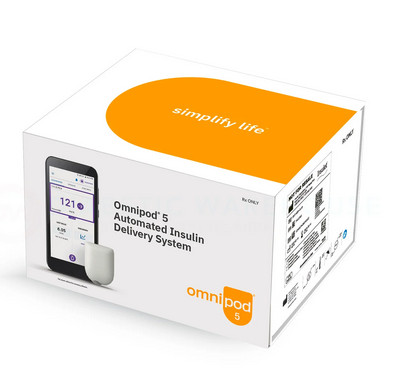
Look, managing diabetes with your pods is already complex enough without having to figure out another app, right? As a guide for new pod users, I’ll show you exactly how to master this essential diabetes management tool.
Getting Started with Your Intro Kit
Before diving into the app itself, let’s talk about your intro kit. The Omnipod 5 intro kit comes with everything you need to begin your journey, including: * Your first set of pods * Training materials * Quick start guide * Support information Pro tip: Take time to review everything in your intro kit before activating your first pod.
How the Omnipod 5 App Works With Your Omnipod Device
The Omnipod 5 app is your diabetes command center, connecting seamlessly with your Omnipod device to track glucose 24/7. Before diving in, be sure to check www.omnipod.com for the latest system requirements and updates. If you’re upgrading from the Omnipod DASH, you’ll notice significant improvements in automation and connectivity.
Essential Omnipod System Components
Your Omnipod system consists of three key elements: the pods, the omnipod controller device, and your CGM. Working together with a compatible smartphone, they create a powerful automated insulin delivery system. The intro kit includes detailed instructions on connecting these components.

Differences Between Omnipod DASH and Omnipod 5
Automation Upgrades
* Automated glucose control (not in DASH) * Smart predictive algorithm * Automatic basal adjustments * More precise bolus calculations * Real-time CGM data integration
Interface Improvements
* Cleaner, more intuitive design * Customizable home screen * Improved graph visibility * Easier meal logging * Better alert management
Connectivity Features
* Smartphone integration * Extended monitoring range * Better Bluetooth stability * Improved data sharing * Future Apple Watch integration planned
The Good, Bad, and “Why Didn’t They Think of That?”
What’s Actually Cool:
* Your compatible smartphone becomes your PDM (finally!) * Automated insulin adjustments based on your CGM data
* Custom glucose targets for different times of day * Seamless integration between your Omnipod device and app * Comprehensive intro kit support materials
The Not-So-Great Stuff:
* Only works with Samsung and Google Pixels right now (iPhone users, I feel your pain) * Needs constant Bluetooth connection * Takes up decent phone battery (keep that charger handy)
Setting Up Your Omnipod 5 App Without Losing Your Mind
- Charge your device fully
- Download from Google Play Store
- Create your account
- Enter medical details
Pod Activation (20 minutes):
- Clean the insertion site
- Fill the pod with insulin
- Follow the app’s activation wizard
- Verify proper insertion
Fine-tuning (1-2 days):
* Start with conservative basal rates
* Monitor closely for 24 hours
* Adjust alerts as needed
* Document any issues
Real-World Usage Tips and Tricks
After working with countless pod users, here are some pro tips for daily use:
Battery Management
- Keep a portable charger handy
- Enable battery optimization settings
- Close background apps
- Consider a backup power bank for long days
Data Management
- Export your data weekly
- Set up automatic backups
- Review trends monthly
- Share reports with your healthcare team
Costs and Insurance Considerations
Understanding the financial aspects of the Omnipod 5 system is crucial:
What’s Covered
- The intro kit is typically covered by insurance
- Monthly pod supplies
- App is free to download
- CGM sensors and supplies
- Prescription medications
Common Insurance Requirements
* Prior authorization
* Letter of medical necessity
* CGM qualification
* Documentation of diabetes management
* Regular supply reorders

Using the Omnipod Display App Across Different Devices
Let’s talk about something that confuses a lot of people – the whole device compatibility situation.
The Omnipod Display App Options
Right now, the Omnipod display app game is split into two camps. Android users get the full experience, while Apple fans are in a different boat.
What About Apple Users?
If you’re team Apple, here’s the deal:
- The main app isn’t in the App Store yet
- Your iPad won’t run it (yet)
- Apple Watch integration is coming soon
- But don’t throw in the towel – Omnipod is working on Apple compatibility
Troubleshooting Common Issues
Here are solutions to the most frequent challenges:
Connection Issues
- Reset Bluetooth connection
- Check phone compatibility
- Ensure pods are within range
- Verify app permissions
- Update system software
App Performance
* Clear app cache regularly
* Restart app if sluggish
* Check storage space
* Update to latest version
* Monitor phone temperature
Pod Communication
- Verify proper placement
- Check for interference
- Maintain proper distance
- Monitor signal strength
- Replace pod if necessary
Looking Ahead: Future Platform Support
The word on the street is that expanded support is coming for the Omnipod 5 app. The App Store version is in development, but no official release date yet. Visit www.omnipod.com for the latest updates on compatibility. Remember, for now, stick to the official compatibility list – trying to force it on unsupported devices just leads to headaches.
Frequently Asked Questions About the Omnipod 5 App
How much does the Omnipod 5 app cost?
The app itself is free, but you need the Omnipod system prescription and intro kit to get started.
Can I use the app without a CGM?
Nope, it would be best if you had a Dexcom G6 for full functionality with your Omnipod device.
What phones work with the Omnipod 5 app?
Currently compatible with select Samsung and Google Pixel models. Check their website for the latest list.
Is the intro kit included with my prescription?
Yes, your healthcare provider will ensure you receive the complete intro kit with your initial prescription.
How often does the app update?
Updates roll out every few months with bug fixes and feature improvements.
Can multiple family members track the data?
Yes, through the separate Omnipod VIEW app. Remember, the Omnipod 5 app is just a tool – but when paired with your Omnipod device, it’s one that’s making diabetes management a whole lot smoother for many of us.
doxycycline for dogs
doxycycline for dogs
atorvastatin calcium 80 mg
atorvastatin calcium 80 mg
where to buy ivermectin for humans
where to buy ivermectin for humans
how can i get zithromax
how can i get zithromax
mirtazapine 15 mg tablet price
mirtazapine 15 mg tablet price
antibiotics online
antibiotics online
lasix for dogs cost
lasix for dogs cost
udenafil tablet 100 mg
udenafil tablet 100 mg
doxycycline for uti men
doxycycline for uti men
viagra in kenya
viagra in kenya
prilosec stomach ache
prilosec stomach ache
levitra or viagra
levitra or viagra
viagra dapoxetine tablet
viagra dapoxetine tablet
orlistat side effect summary
orlistat side effect summary
amoxicillin general information
amoxicillin general information
Peak Concentration With Food
Peak Concentration With Food